
Telenor SIM Owner Details – How to Check SIM Registration
Telenor SIM owner details show who registered a Telenor SIM and whether it links to the correct CNIC. This information helps confirm SIM ownership, subscriber registration, and mobile network registration. Many users search for Telenor SIM owner details to verify their own SIM, check SIMs registered on their CNIC, or spot unauthorized registrations. However, you cannot legally find the personal details of someone else’s Telenor number. Pakistan protects subscriber privacy. The Pakistan Telecommunication Authority (PTA) only allows you to verify information related to your own identity or the SIM you use through approved channels.
Telenor SIM Ownership Audit
Secure Verification & Identity Protection Guide
Loading security question…
Privacy Protected: We do not store or share your input. This tool provides guidance based on official Telenor & PTA protocols.
Auditing Telenor Database…
Connecting to Secure Verification Nodes
10s remaining
Official Telenor Verification Methods
Send MNP to 667 from your Telenor SIM to see registered name and CNIC.
Send your CNIC to 668 via SMS to verify all numbers on your identity.
Access the official government portal for a complete digital identity audit.
Open Official PortalAlways use official PTA SIM verification services or Telenor customer support. Avoid websites that promise Telenor SIM owner checks for any mobile number. They may provide false information or put your personal data at risk. In this guide, you will learn how to check Telenor SIM registration details, verify Telenor SIM ownership, review SIMs linked to your CNIC, and protect your mobile identity by using trusted verification methods.
What Are Telenor SIM Owner Details?
Telenor SIM owner details refer to the information linked to a registered Telenor SIM card. This record confirms who owns the SIM and whether it was activated under the correct CNIC. It also helps verify the subscriber’s identity and ensures the SIM follows Pakistan’s telecom regulations. Every active Telenor SIM must complete biometric verification before activation, making the registration record an important part of mobile security.
Information Included in SIM Registration
A Telenor SIM registration record typically includes:
- Registered Name: The name of the person who owns the SIM.
- CNIC: The Computerized National Identity Card used during registration.
- Mobile Number: The Telenor number linked to the registered subscriber.
- Network: The mobile operator managing the SIM card.
- Registration Status: Whether the SIM is active, verified, and properly registered.
These details help confirm SIM ownership and support secure mobile number verification.
Why SIM Verification Matters
Checking your Telenor SIM registration details protects your identity and mobile account. It helps you confirm that your SIM is registered under your own CNIC. Regular Telenor SIM verification can also reveal unauthorized SIMs linked to your identity. This simple check reduces the risk of fraud, identity misuse, and account-related problems. It also ensures your mobile services remain secure and compliant with Pakistan Telecommunication Authority (PTA) regulations.
Can You Check Telenor SIM Owner Details Online?
Yes, you can check Telenor SIM owner details online, but only through official verification methods. The Pakistan Telecommunication Authority (PTA) and Telenor provide services that let you verify your own SIM registration details. These services protect your identity and follow Pakistan’s telecom regulations.
Pakistan’s privacy laws do not allow public access to another person’s SIM owner information. You cannot legally search for the registered name, CNIC, address, or other personal details of a random Telenor number. Only the registered subscriber can access or verify this information through approved channels.
Official verification methods allow you to confirm information related to your own account. For example, you can check the number of SIMs registered on your CNIC, verify your Telenor SIM registration, confirm your network, and review your registration status. These checks help protect your mobile identity and detect unauthorized SIMs.
Many websites claim to offer a free Telenor SIM owner lookup or Telenor number owner check. Avoid these services. They do not have legal access to PTA’s subscriber database. Some display outdated or inaccurate records, while others collect personal information for misuse. Always rely on official PTA SIM verification tools or Telenor customer support for accurate and secure SIM ownership verification.
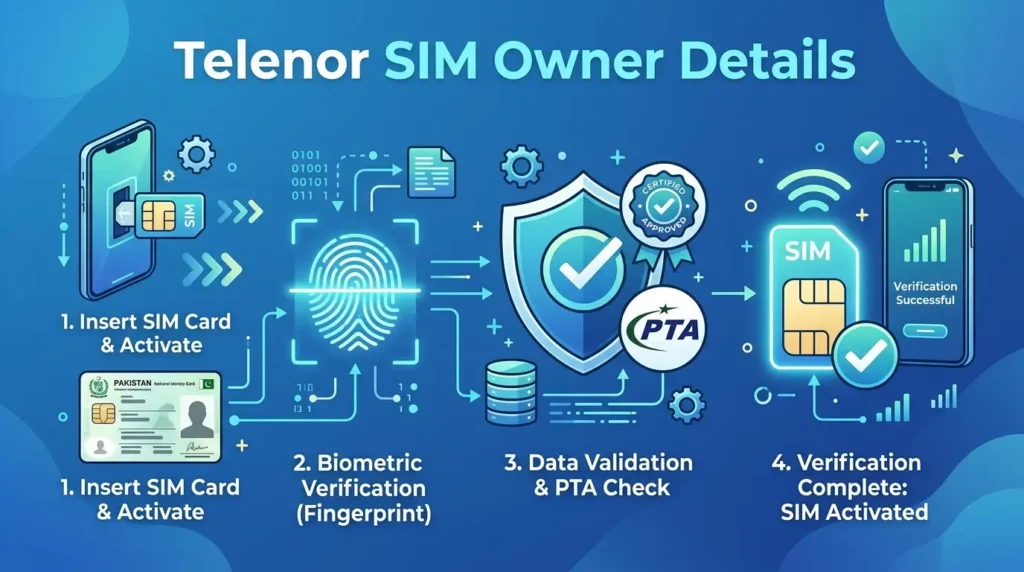
How to Check Telenor SIM Owner Details (Step-by-Step)
You can verify your Telenor SIM owner details through official channels only. These methods help you confirm SIM registration, check SIMs registered on your CNIC, and protect your mobile identity. Follow the steps below for accurate and secure verification.
Method 1 — PTA SIM Information System
The PTA SIM Information System is the easiest way to check SIMs linked to your CNIC.
Follow these steps:
- Visit the official PTA SIM Information System website.
- Enter your 13-digit CNIC without dashes.
- Complete the security verification.
- Submit your request.
The system displays the number of active SIMs registered against your CNIC for each mobile network, including Telenor. This method helps you identify unauthorized subscriber registrations and monitor your mobile network registration. If you notice an unknown SIM, contact Telenor immediately for assistance.
Method 2 — SMS Verification
If you do not have internet access, use the PTA SMS service.
Here’s how:
- Open your phone’s messaging app.
- Type your 13-digit CNIC without dashes.
- Send it to 668.
Within a few moments, you will receive a reply showing the number of SIMs registered under your CNIC across all mobile operators. This quick CNIC SIM check helps you confirm whether unexpected SIMs appear under your identity.
Method 3 — Check Your Own SIM Registration
You can also verify the registration details of the Telenor SIM you are currently using.
Follow these steps:
- Open your messaging app.
- Type MNP.
- Send it to 667 from your Telenor SIM.
The response usually includes your registered name, the mobile network, and a partially masked CNIC. Review these details carefully. If they do not match your identity, contact Telenor customer support without delay.
Method 4 — Visit a Telenor Franchise
Visit a nearby Telenor franchise if you need complete ownership verification or face registration issues.
Take your original CNIC with you. A representative will verify your identity through biometric verification. They can confirm your Telenor SIM registration details, update subscriber records when required, and help resolve ownership disputes. This method offers the highest level of security because it verifies your identity in person and ensures your SIM remains registered under the correct owner.
How to Verify Telenor SIM Registration
Verifying your Telenor SIM registration ensures your mobile number remains linked to the correct CNIC. It also protects your identity and helps prevent unauthorized SIM usage.
The first step is to confirm your registration status through official PTA verification services or Telenor customer support. These services show whether your SIM is properly registered and active. If the records match your identity, you can continue using your mobile services without interruption.
Biometric verification plays a key role in the registration process. Every new Telenor SIM requires fingerprint verification before activation. This process confirms your identity and helps prevent fraudulent registrations. If your biometric record does not match, Telenor may ask you to complete the verification again at a franchise.
You should also confirm that your SIM has completed SIM activation. An activated SIM can access calls, messages, mobile data, and other network services. If activation fails, contact Telenor for assistance.
Finally, complete ownership confirmation by checking that your registered name and CNIC match your personal records. If you find incorrect information or suspect identity misuse, report the issue immediately. Quick action helps protect your account and keeps your subscriber information accurate.
How to Check SIMs Registered on Your CNIC
Checking SIMs registered on your CNIC helps you manage your mobile identity and improve account security. It allows you to confirm that every registered SIM belongs to you. This simple check can also reveal unauthorized numbers before they create serious problems.The Pakistan Telecommunication Authority (PTA) provides official methods to verify SIM registrations. You can use the PTA SIM Information System or send your CNIC to 668. Both methods display the number of active SIMs registered under your CNIC across all mobile networks.Review the results carefully. If you notice a SIM that you do not recognize, contact Telenor or the relevant mobile operator immediately. They can investigate the registration and guide you through the removal process.Removing unknown SIMs protects your identity and reduces the risk of fraud, financial loss, and unauthorized account activity. Make it a habit to check your CNIC SIM details regularly. Regular SIM ownership verification helps you maintain accurate subscriber records and keeps your mobile account secure.
What Information Can You Legally Access?
Pakistan’s telecom laws protect every mobile subscriber’s privacy. You can verify information related to your own Telenor SIM or CNIC, but you cannot access another person’s personal records without legal authorization. The Pakistan Telecommunication Authority (PTA) only allows official SIM ownership verification through approved services. These rules help prevent identity theft, fraud, and unauthorized access to subscriber information.
When you use official PTA SIM verification methods, you can confirm whether your SIM is correctly registered and review the number of SIMs linked to your CNIC. However, personal information about another subscriber remains private. Telenor and PTA do not disclose confidential customer records to the public. Always use official verification channels instead of third-party websites that claim to reveal private subscriber details.
| Available | Not Available |
| Your own SIM registration status | Another person’s CNIC |
| Your registered mobile network | Someone else’s address |
| Number of SIMs linked to your CNIC | Private subscriber data |
| Registration confirmation for your own SIM | Personal records of another user |
Understanding these limits helps you verify your Telenor SIM registration details legally and responsibly. It also protects your privacy while ensuring compliance with Pakistan’s telecom regulations.
Common Problems During Verification
Most users complete Telenor SIM verification without difficulty. However, some issues can prevent a successful SIM registration check. Knowing these common problems helps you fix them quickly.
CNIC Not Matching
Your verification may fail if the registered CNIC does not match your current identity records. This usually happens after a SIM transfer or incorrect registration. Contact Telenor to update your subscriber information.
SIM Not Active
An inactive SIM cannot complete some verification services. Make sure your Telenor SIM is active and connected to the network before checking its registration details.
SMS Errors
You may not receive a response after sending your CNIC to 668 or MNP to 667. Check that you entered the correct information. Ensure you have sufficient balance if SMS charges apply. Then try again after a few minutes.
Network Issues
Poor network coverage or temporary service outages can delay verification. Move to an area with a stronger signal or wait until network services return to normal.
Biometric Mismatch
A fingerprint mismatch can stop SIM ownership verification. Visit a Telenor franchise with your original CNIC to complete a new biometric verification.
Expired CNIC
An expired CNIC may prevent successful identity verification. Renew your CNIC through the relevant authorities before requesting changes to your Telenor SIM registration. Keeping your identity records current helps ensure accurate subscriber registration and uninterrupted mobile services.
Tips to Keep Your Telenor SIM Secure
Protecting your Telenor SIM is just as important as verifying its registration. Good security habits reduce the risk of fraud, identity theft, and unauthorized access to your mobile account.
- Never share OTPs: One-Time Passwords protect your accounts. Never share them with anyone, even if they claim to represent Telenor or another trusted organization.
- Check your CNIC regularly: Use official PTA SIM verification services to review the SIMs registered on your CNIC. Regular checks help you spot unauthorized registrations early.
- Block a lost or stolen SIM immediately: Contact Telenor customer support as soon as you lose your SIM. Quick action prevents unauthorized calls, messages, and account misuse.
- Keep your biometric verification up to date: Visit a Telenor franchise if your fingerprint verification needs an update. Accurate biometric records help maintain secure SIM ownership.
- Report unauthorized SIMs: If you find a mobile number that does not belong to you, report it to Telenor immediately. Early reporting helps protect your identity and prevents further misuse.
- Use official channels only: Always rely on PTA services, Telenor customer support, or authorized franchises for SIM verification and ownership confirmation. Avoid third-party websites that promise access to private subscriber information. They may expose your personal data and provide inaccurate results.
Frequently Asked Questions
How can I check Telenor SIM owner details?
You can check your Telenor SIM owner details through official methods. Use the PTA SIM Information System, send your CNIC to 668, or send MNP to 667 from your own Telenor SIM. These services help verify your SIM registration details and ownership.
Can I check Telenor SIM owner by number?
You can only verify the registration details of a SIM you own or use. Pakistan’s privacy laws do not allow public access to another person’s SIM owner information by mobile number alone.
Is there an online Telenor SIM owner checker?
Yes, you can use official PTA services to verify your own SIM registration. Avoid third-party Telenor SIM owner check websites. They cannot access official subscriber records and may misuse your personal information.
How do I verify Telenor SIM registration?
Verify your Telenor SIM registration through PTA services, SMS verification, or by visiting a Telenor franchise. If required, complete biometric verification using your original CNIC.
Can I check SIMs registered on my CNIC?
Yes. Visit the PTA SIM Information System or send your 13-digit CNIC to 668. You will receive the total number of active SIMs registered under your CNIC across all mobile networks.
Is checking someone else’s SIM owner information legal?
No. Subscriber information remains private under Pakistan’s telecom regulations. You cannot legally access another person’s registered name, CNIC, address, or other personal records without proper legal authority.
What should I do if an unknown SIM is registered against my CNIC?
Contact Telenor or the relevant mobile operator immediately. Request an investigation and ask them to remove any unauthorized SIM after verifying your identity.
How can I contact Telenor customer support?
You can contact Telenor through its customer helpline, visit an authorized franchise, or use the official website and mobile app for assistance with SIM verification, registration issues, and ownership confirmation.
Conclusion
Checking your Telenor SIM owner details helps protect your mobile identity and keeps your subscriber information accurate. Always use official PTA SIM verification services or Telenor support to verify your SIM registration. Never rely on third-party websites that claim to reveal private subscriber details.Review the SIMs registered on your CNIC regularly to identify unauthorized numbers before they become a security risk. Complete biometric verification whenever Telenor requests it or when updating your registration records. If you notice incorrect information or an unknown SIM linked to your CNIC, report it without delay.By following these official verification methods, you can secure your Telenor SIM, prevent identity misuse, and stay compliant with Pakistan’s telecom regulations. Regular checks and timely action are the best ways to keep your mobile account safe.