
Etisalat SIM owner details: how to verify registration safely in the UAE
Many people search for Etisalat SIM owner details to check who a SIM belongs to or confirm its registration. In most cases, they want to verify their own mobile number or account.
Official Etisalat SIM Verification Portal
To protect your privacy, Etisalat (e& UAE) requires official verification to access SIM owner details. Choose your preferred official method below to verify your registration status instantly.
In the UAE, personal subscriber information stays private. You cannot search the owner of an Etisalat mobile number using only the phone number. UAE privacy rules protect this information.

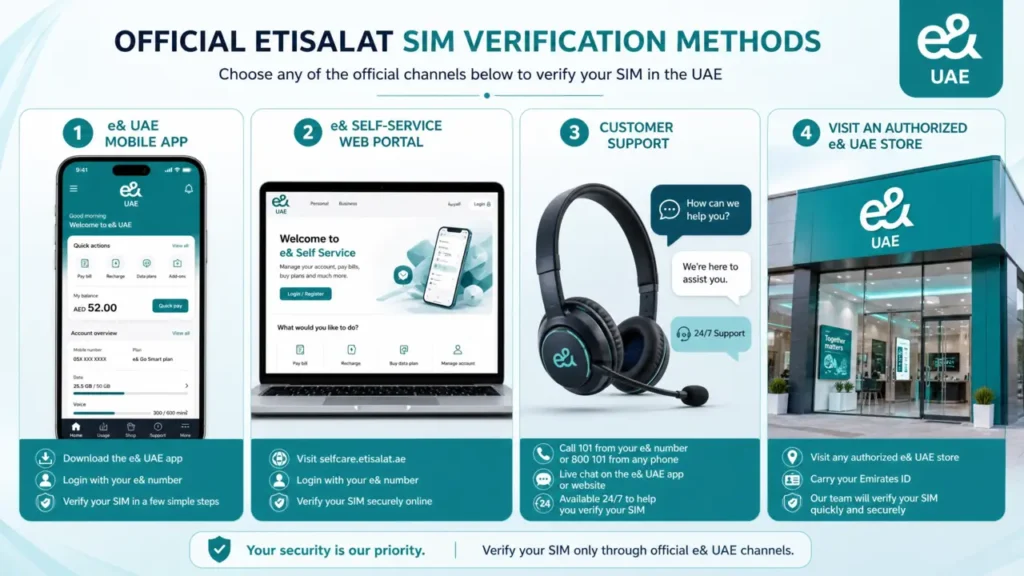
If you need to verify your own SIM, use official e& UAE services. You can sign in to your account, use the e& UAE app, contact customer support, or visit an authorized store. These methods help protect your identity and keep your account secure.
This guide explains the official ways to check Etisalat SIM registration details, verify SIM ownership, and confirm your account information safely and legally.
What “Etisalat SIM owner details” means
The term Etisalat SIM owner details covers the information linked to a registered SIM card. This information helps confirm that the SIM belongs to the correct customer.
It may include:
- The registered SIM holder’s name.
- The SIM registration status.
- The mobile number linked to an Emirates ID.
- Account ownership and subscription details.
- SIM activation and verification records.
Only the registered customer or an authorized account holder can access these details through official e& UAE channels. This process protects subscriber information and supports UAE telecom security requirements.
Important privacy and legal limits
e& UAE does not provide a public service to reveal the owner of someone else’s phone number. UAE privacy laws and telecom regulations protect subscriber information. These rules help keep customer data safe and secure.
Only the registered SIM owner or an authorized account holder can view account details. You must verify your identity before accessing this information.
You may need one or more of these verification methods:
- Emirates ID
- UAE PASS
- One-Time Password (OTP)
- Account login credentials
Always use official e& UAE channels to verify your Etisalat SIM owner details or registration status. Avoid websites or apps that claim to reveal SIM owner names. Do not trust leaked databases, scraping tools, or third-party lookup services. They may violate privacy laws, expose your personal data, or provide false information.
This approach protects your account and follows UAE telecom regulations.
Official ways to verify your Etisalat SIM registration
The safest way to verify Etisalat SIM registration details is through official e& UAE services. These methods protect your personal information and follow UAE telecom regulations.
Check through the e& UAE app
The e& UAE app lets you manage your mobile account from anywhere.
Follow these steps:
- Open the e& UAE app.
- Sign in with your registered mobile number or account.
- Open Account, Profile, or SIM Management.
- Review your registered number, subscription, and available account details.
Use the self-service portal
You can also verify your account through the official e& UAE self-service portal.
- Sign in with your registered account.
- Open your account dashboard.
- Check your SIM registration status and mobile account details.
Contact e& customer support
If you cannot access your account, contact e& UAE Customer Support.
A support representative may ask you to verify your identity using:
- Emirates ID
- Passport
- One-Time Password (OTP)
- Registered account information
After verification, they can help you confirm your SIM registration or resolve account issues.
Visit an authorized e& UAE store
Visit an authorized e& UAE store if you need in-person assistance.
Bring your Emirates ID or another valid identification document. A store representative can verify the SIM registration linked to your account.
This option also helps with:
- SIM ownership transfer
- SIM replacement
- Account updates
- Registration issues that need manual support
These official methods give you accurate information while keeping your account secure.
How to check if an Etisalat SIM is registered in your name
You can confirm whether an Etisalat SIM is registered in your name through your official e& UAE account. This method gives you accurate and secure information.
Follow these steps:
- Sign in to your e& UAE account or the e& UAE app.
- Open your account profile or SIM management section.
- Review the mobile numbers linked to your Emirates ID or account.
- Check the SIM registration or subscriber information for each number.
If you see a mobile number you do not recognize, contact e& UAE Customer Support immediately. They can verify your identity, investigate the issue, and help protect your account from unauthorized use.
What information you can legally access
You can access information related to your own Etisalat SIM after completing identity verification. UAE privacy laws protect subscriber data and limit access to personal information.
| Information | Availability |
|---|---|
| Your registered mobile number | Available after account login or identity verification |
| Your SIM registration status | Available through official e& UAE channels |
| Your account and subscription details | Available to the registered account holder |
| Another person’s SIM owner name | Not publicly available |
| Another person’s subscriber information | Protected by UAE privacy laws and telecom regulations |
If you need to verify your account, always use official e& UAE services. They provide accurate information while protecting your privacy and security.
If the SIM is registered under the wrong Emirates ID
If you believe your Etisalat SIM is registered under the wrong Emirates ID, act as soon as possible. Quick action helps protect your account and personal information.
Follow these steps:
- Contact e& UAE Customer Support or visit an authorized e& UAE store.
- Bring your Emirates ID and any supporting account documents.
- Ask the representative to verify the mobile numbers linked to your ID.
- Request a correction if the registration is incorrect.
- If needed, ask about the SIM ownership transfer process and the required documents.
The support team will guide you through the verification process and explain the next steps based on your account details and UAE telecom requirements.
SIM ownership transfer and related requests
You may need to update your Etisalat SIM details after a change in ownership or personal information. Use official e& UAE channels to complete these requests safely.
SIM ownership transfer
You can request a SIM ownership transfer between eligible individuals. Both parties may need to verify their identity and provide the required documents.
SIM replacement
Request a replacement if your SIM is lost, stolen, or damaged. e& UAE will verify your identity before issuing a new SIM.
Account information updates
Update your account if your name, Emirates ID, or other personal details change. Keeping your information current helps prevent service issues.
Authorized user verification
If someone manages your mobile account with your permission, e& UAE may verify their authorization before processing certain requests.
Always follow the official verification process to protect your account and ensure your records remain accurate.
Common questions users ask
Can I check Etisalat SIM owner details online?
Yes, you can check details for your own registered account through official e& UAE channels. You must complete identity verification before accessing your account. You cannot use a phone number to find another person’s SIM owner details.
How do I verify an Etisalat SIM?
Use one of the official verification methods offered by e& UAE:
- The e& UAE app
- The self-service portal
- e& UAE Customer Support
- An authorized e& UAE store
You may need your Emirates ID, UAE PASS, a One-Time Password (OTP), or your account login details.
How do I know if an Etisalat SIM is registered in my name?
Sign in to your official e& UAE account and review the mobile numbers linked to your profile. Check the SIM registration details for each number. Contact e& UAE Customer Support if you find incorrect or unfamiliar information.
Can I find the owner of an Etisalat mobile number?
No. You cannot find the owner of another person’s Etisalat mobile number. UAE privacy laws protect subscriber information. Only the registered account holder or an authorized user can access these details through official verification.
Tips for keeping your Etisalat SIM secure
Protecting your Etisalat SIM helps prevent unauthorized access and keeps your account safe.
- Keep your Emirates ID, password, and account credentials private.
- Enable One-Time Password (OTP) and other available security features.
- Review the mobile numbers linked to your account regularly.
- Update your contact details if your information changes.
- Report any unknown or unauthorized SIM registrations to e& UAE Customer Support immediately.
- Avoid sharing verification codes with anyone, even if they claim to represent e& UAE.
- Use only official e& UAE apps, websites, and customer service channels to manage your account.
These simple steps improve your account security and help protect your personal information.
Conclusion
The safest way to verify Etisalat SIM owner details is through official e& UAE channels. Use the e& UAE app, the self-service portal, customer support, or an authorized store to access your account information.
UAE privacy laws protect subscriber data and do not allow public access to another person’s SIM owner details. Only the registered account holder or an authorized user can view this information after identity verification.
Always use official verification methods and keep your account details secure. This approach protects your personal information and ensures your Etisalat SIM registration details remain accurate and up to date.